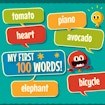
ABOUT THE GAME
My First 100 Words game overview
Immerse your child in "My First 100 Words," a vibrant language adventure! They will explore multiple languages through playful interactions, spotting emojis while hearing correct pronunciations. With increasing challenges, they’ll build vocabulary and cultural awareness, making learning a captivating journey. Watch them thrive as they start a multilingual quest!
My First 100 Words has been selected for the MaxGG Top 100 collection as a strong educational experience. The game uses a 600 × 800 play area and runs directly in a modern browser without a download.
GETTING STARTED
How to play My First 100 Words
Use the player above and follow the instructions shown by My First 100 Words. Check the opening prompts before beginning because the game provides the exact controls for your device.
Immerse your child in "My First 100 Words," a vibrant language adventure! Start with a careful first attempt, learn how the game responds, and refine your approach as the challenge develops.
CONTROLS
Game controls
Use the on-screen prompts provided by the game. Portrait mode is recommended on phones.
PLAY SMARTER
Tips for My First 100 Words
- Read the full prompt before acting; these games often punish a fast answer more than a slow one.
- Break difficult questions into smaller steps and eliminate obviously wrong choices first.
- Notice the type of mistake you make, then slow down specifically when that pattern returns.